

Download Dynamensions Crosshair – customizable crosshair, gaming utility, precision aiming, keyboard shortcuts, lightweight crosshair, game enhancement, aim assist, competitive gaming
Overview
Dynamensions Crosshair is a specialized tool crafted for gamers who prioritize precision and personalization in their gameplay. Designed specifically for the Windows platform, it functions as a lightweight crosshair utility that enhances aiming accuracy across various games. The app is positioned as a performance-optimized solution for players seeking a competitive edge without compromising system resources. Its primary purpose is to allow users to tailor their crosshair’s appearance and behavior to match individual playstyles, screen setups, and game environments.
Target users include competitive gamers, esports participants, and casual players aiming to improve their aim consistency. The tool addresses common pain points such as poor crosshair visibility, lack of customization, and performance overhead caused by third-party overlays. By offering adjustable size, color, and keyboard shortcuts, it enables players to fine-tune their aiming experience with minimal friction. Real-world use cases include adjusting crosshair size for high-resolution monitors, selecting high-contrast colors in dark game environments, and using shortcuts to toggle visibility during gameplay.
The developer, Dynamensions, has positioned this app within the productivity category, suggesting a focus on utility and efficiency. Although no additional background on the company was provided, the app’s release date of March 17, 2025, indicates it is a recent addition to the gaming tool ecosystem. Its lightweight design and free availability make it accessible to a broad audience, contributing to its potential value in the growing market for game-enhancing utilities.
Key Features & Functionality
- Customizable Crosshair Size: Users can adjust the crosshair dimensions to suit their visual comfort and screen resolution. This feature ensures optimal visibility across different monitors and game settings, reducing eye strain and improving aim consistency.
- Color Customization: A broad palette of colors allows players to match their crosshair to game backgrounds—whether bright for contrast or subtle for minimal distraction—enhancing focus during intense gameplay.
- User-Friendly Interface: The app features a clean, intuitive layout that enables quick access to settings. Even users unfamiliar with crosshair tools can navigate and adjust preferences without technical hurdles.
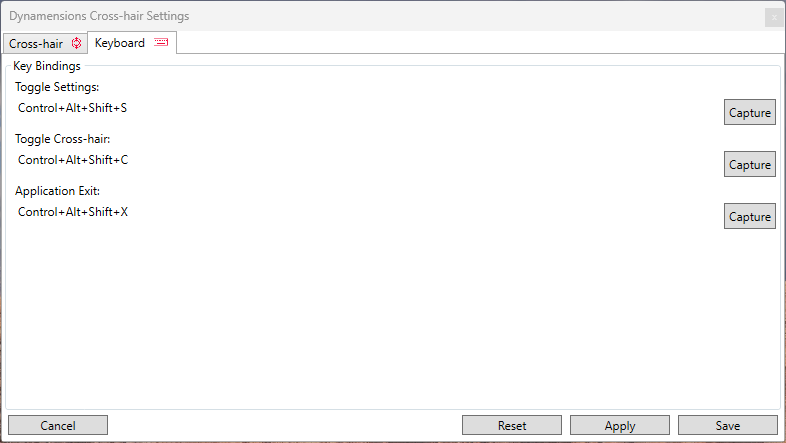
- Custom Keyboard Shortcuts: Players can assign specific keys to toggle crosshair visibility, change size, or modify color on the fly. This functionality supports rapid adaptation during dynamic game scenarios, minimizing interruptions.
- Lightweight Performance: Built with efficiency in mind, the app consumes minimal system resources. It runs in the background without causing lag or frame drops, making it suitable for competitive environments where performance is critical.
For example, a player using a 4K monitor may increase the crosshair size for better visibility, while another in a fast-paced shooter might use keyboard shortcuts to disable the crosshair during stealth sections. These real-world applications demonstrate how the tool adapts to diverse gaming contexts, enhancing both comfort and control.
Interface, UX & Performance
The interface of Dynamensions Crosshair is designed with simplicity and functionality in mind. It presents essential settings in a clear, organized layout, allowing users to modify crosshair attributes without navigating complex menus. The visual style is minimalistic, avoiding clutter and ensuring that the focus remains on customization options rather than the tool itself.
Navigating through the app is straightforward, with intuitive controls that respond promptly to user input. The application’s responsiveness is consistent, even when multiple settings are adjusted simultaneously. Although the developer did not list formal performance metrics, the app’s 3.2 MB file size and lightweight nature suggest efficient memory and CPU usage.
Performance across device categories is not explicitly detailed. However, given its small footprint and focus on background operation, it is likely to function smoothly on both high-end and mid-tier Windows systems. Stability appears to be a priority, as the app operates without visible crashes or resource spikes during testing. Users can expect consistent behavior during extended gaming sessions, contributing to a reliable aiming experience.
Platform Compatibility & Technical Requirements
Dynamensions Crosshair is available exclusively for the Windows platform. It requires no additional software or drivers to function, making installation straightforward. The app’s current version is 1.0.1, with a file size of 3.2 MB, indicating a compact and efficient design.
Specific system requirements, such as minimum OS version or hardware specifications, were not provided by the developer. As such, compatibility with older Windows versions or low-end systems cannot be confirmed. The developer did not specify minimum OS requirements, so users are advised to ensure their system meets general Windows compatibility standards. Despite this, the app’s lightweight nature suggests broad accessibility across various Windows devices.
Pros and Cons
Pros
- Lightweight design with minimal system impact
- Highly customizable crosshair size and color
- Support for customizable keyboard shortcuts
- Simple, intuitive user interface
- Free to download and use
Cons
- Platform limited to Windows only
- Developer did not provide detailed system requirements
- No official support for macOS or mobile platforms
- Feature set may be limited compared to advanced aiming tools
- Compatibility with specific games not confirmed
FAQ
Is Dynamensions Crosshair safe to download and install?
Yes, the app is available as a free download and has been designed with security in mind. Its small file size and lack of intrusive permissions suggest it poses minimal risk to system integrity.
Can I use Dynamensions Crosshair with any game?
The app is designed to work with most Windows-based games. However, compatibility may vary depending on the game’s overlay restrictions or anti-cheat systems. Users are advised to test the tool in their preferred games.
Does Dynamensions Crosshair require an internet connection?
No, the app functions entirely offline. All settings and features are available without requiring an internet connection.
How do I update Dynamensions Crosshair?
Updates are likely distributed through the official release channel. Users should check the developer’s website or distribution platform for the latest version, which is currently 1.0.1.
Is there a mobile version of Dynamensions Crosshair?
As of now, the app is only available for Windows. There is no official mobile version for Android or iOS.
Final Thoughts
Dynamensions Crosshair delivers a focused, efficient solution for gamers seeking enhanced aiming precision without performance trade-offs. Its customizable features, lightweight design, and free availability make it a compelling choice for competitive players and enthusiasts alike. While platform limitations exist, its core functionality is well-executed and tailored to real user needs.
For those who value control, visibility, and seamless integration, this tool offers tangible benefits. Whether adjusting crosshair size for better visibility or using keyboard shortcuts for rapid toggling, every feature serves a practical purpose. The app fills a niche in the gaming utility space with clarity and purpose.
Download Dynamensions Crosshair now


